
AURORAL Data Catalogue Wiki
This section provides a step-by-step guide for registering datasets using the AURORAL middleware and node.
What is the AURORAL Data Catalogue?
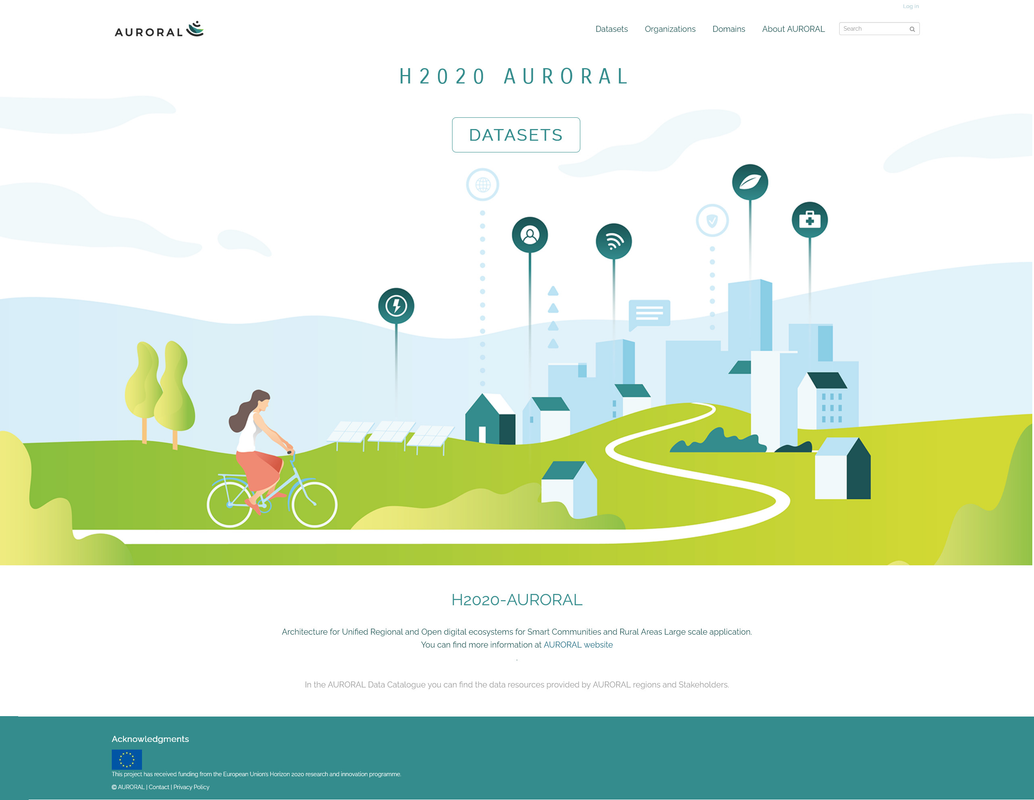
The AURORAL Data Catalogue (http://auroraldatacatalogue.eu) is an open data portal that serves as a hub for data resources from the entities participating in the AURORAL ecosystem. It serves as a key tool for showcasing and making accessible the datasets created by them.
Unlike traditional data storage systems, the AURORAL Data Catalogue does not store data directly. Instead, it offers a centralized directory where resources are listed and linked to the locations (URIs) where the actual datasets are hosted. This approach ensures that data remains decentralized and under the control of the entities that produce it, promoting privacy and security.
The service is fully automated and works through the AURORAL middleware, which discovers datasets from the AURORAL nodes in real time once they have been registered by their users. By leveraging this middleware, the Data Catalogue provides an up-to-date view of available datasets, automatically reflecting any changes in the underlying data nodes, such as when a dataset is added or removed.
This cataloging service supports a wide range of domains, including mobility, energy, health, and tourism, among others, allowing organizations to share and discover data resources easily. Through this platform, users can search for and filter datasets based on various criteria, making it a powerful tool for fostering collaboration and innovation across different sectors.
Prerequisites
Before using the AURORAL Data Catalogue service, ensure you meet the following requirements:
AURORAL Platform Account: You must have an account on the AURORAL Platform. This is necessary for accessing the AURORAL middleware and connecting through the node.
AURORAL Node Deployment: You need to have a deployed AURORAL Node in your infrastructure. The node will serve as the interface to register and expose your datasets through the AURORAL middleware. You can install your node following the instructions in the AURORAL Documentation
Community Membership: Your node must be part of the Data Catalogue community within the AURORAL Neighbourhood Manager. This membership is required to facilitate the exchange of metadata between the service and the participating nodes.
Web of Things (WoT) Description: Datasets must be described using the Web of Things (WoT) format. This ensures that the metadata is standardized and compatible with the AURORAL ecosystem.
Describing your dataset
The datasets in the AURORAL platform are described according to the Web of Things (WoT) Dictionary, which allows for standardized metadata representation. You can easily register your dataset by using the following template and replacing the placeholder values with your actual dataset information:
{
        "@context": [
          "https://www.w3.org/2019/wot/td/v1",
          {
            "adp": "https://auroral.iot.linkeddata.es/def/adapters#",
            "om": "http://www.ontology-of-units-of-measure.org/resource/om-2/",
            "geo": "http://www.w3.org/2003/01/geo/wgs84_pos#",
            "schema": "https://schema.org/"
          }
        ],
        "security": [
          "nosec_sc"
        ],
        "securityDefinitions": {
          "nosec_sc": {
            "scheme": "nosec"
          }
        },
        "title": "The title for your dataset",
        "@type": "adp:Dataset",
        "domain": "Your domain",
        "provider":"The name of your company/institution",
        "description": "A description of your dataset",
        "url": "The url for accessing your data"
      }
Replace the following fields:
"title": Provide the title of your dataset."domain": Indicate the domain. Available domains are mobility, energy, health, farming, tourism, and other."provider": Your company or institution's name."description": A detailed description of the dataset."url": The URL where the dataset can be accessed.
Once this information is set, you are ready to use the AURORAL API to register your dataset.
How to Register a Dataset in the Node
Access the Node: Open a web browser and navigate to the node using its IP address and port. The format is
http://<node-ip>:<port>. Example:http://192.168.1.10:81orhttp://localhost:81.Choose an Interface: You have two options for interacting with the node:
- API: You can use the AURORAL Open API to register datasets.
- Node UI: You can also use the Node's web-based User Interface (UI) to do it.
2.1. Using the AURORAL Node UI:
Access the NODE UI by adding /ui at the end of your node URL (example http://localhost:81/ui) and then go to the "My Node" section in the left-side menu. This section will allow you to manage the items available in your node, including datasets.
There are two ways to register a new dataset through the UI:
- Click on the + New item button located on the right side of the page, as shown in the image below. You will be presented with two options:
- Use Editor: This allows you to manually input the metadata for the dataset through an editor.
- Upload TD: This allows you to upload a Thing Description (TD) file, which follows the Web of Things (WoT) format.
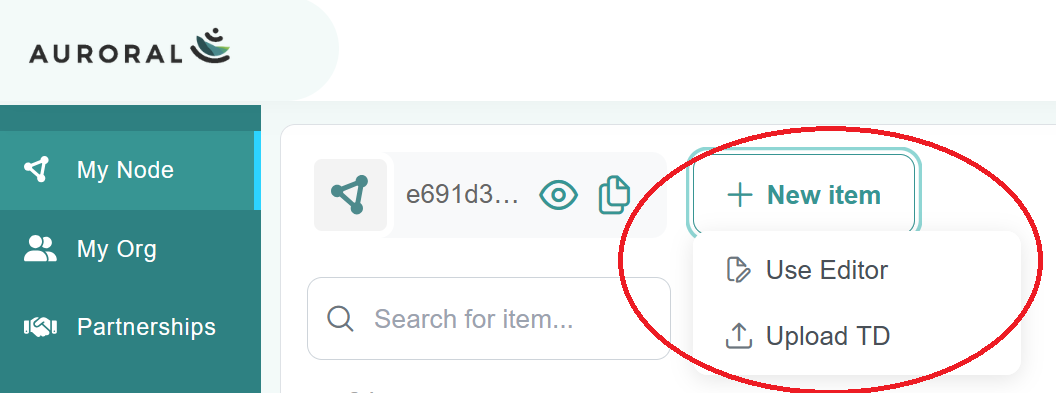
In this case, given that the description of data template is provided, go to Upload TD and copy-paste the thing description of your data in the < Code > tab:
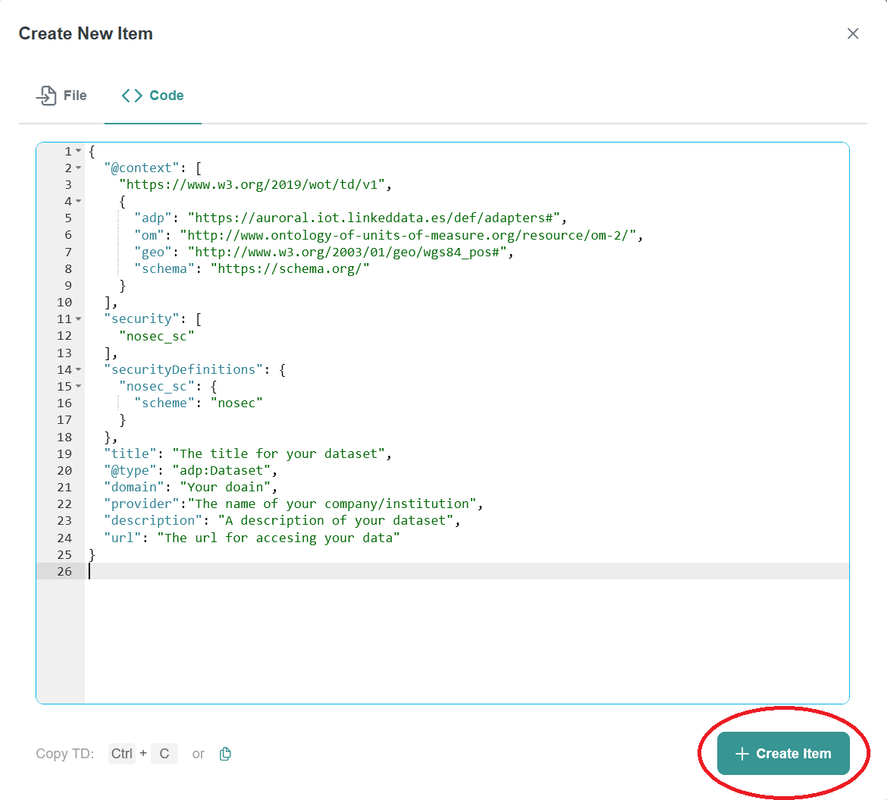
Then, click on + Create Item and your dataset description will be created.
After successfully registering the description of your datasets, it will appear in the list of datasets with a NEW label, as shown in the image below:
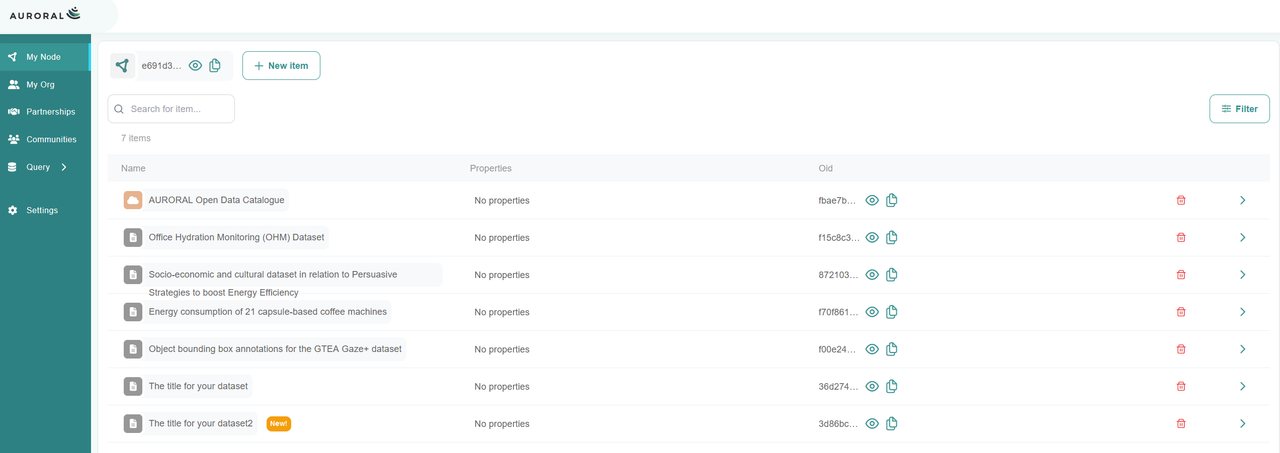
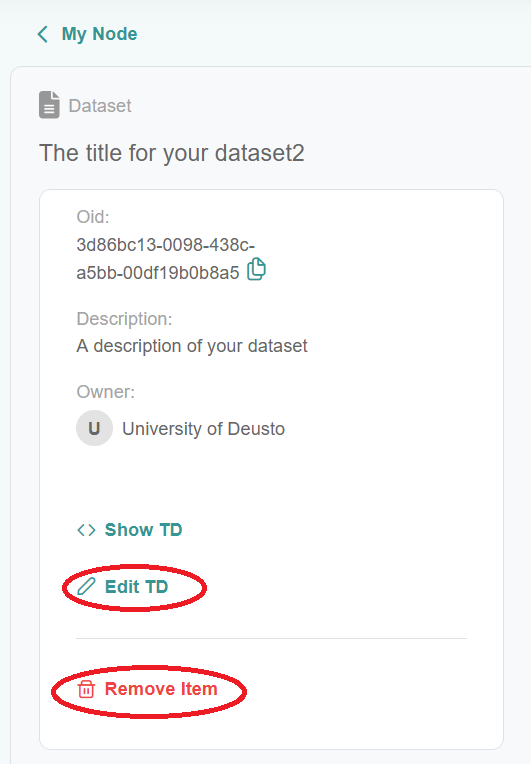
By clicking on the item name, you will be able to remove or edit the dataset description:
2.2. Using the API:
NOTE: When using the API to register a dataset, it is necessary to make a slight modification to the Thing Description (TD). Below, we include the modified TD description that should be used for registration.
{
        "td": {
          "@context": [
            "https://www.w3.org/2019/wot/td/v1",
            {
              "adp": "https://auroral.iot.linkeddata.es/def/adapters#",
              "om": "http://www.ontology-of-units-of-measure.org/resource/om-2/",
              "geo": "http://www.w3.org/2003/01/geo/wgs84_pos#",
              "schema": "https://schema.org/"
            }
          ],
          "security": [
            "nosec_sc"
          ],
          "securityDefinitions": {
            "nosec_sc": {
              "scheme": "nosec"
            }
          },
          "title": "The title for your dataset",
          "@type": "adp:Dataset",
          "domain": "Your domain",
          "provider":"The name of your company/institution",
          "description": "A description of your dataset",
          "url": "The url for accessing your data"
        },
        "avatar": "nostrud sunt"
      }
Go to /api/registration and copy the WoT description of your data.
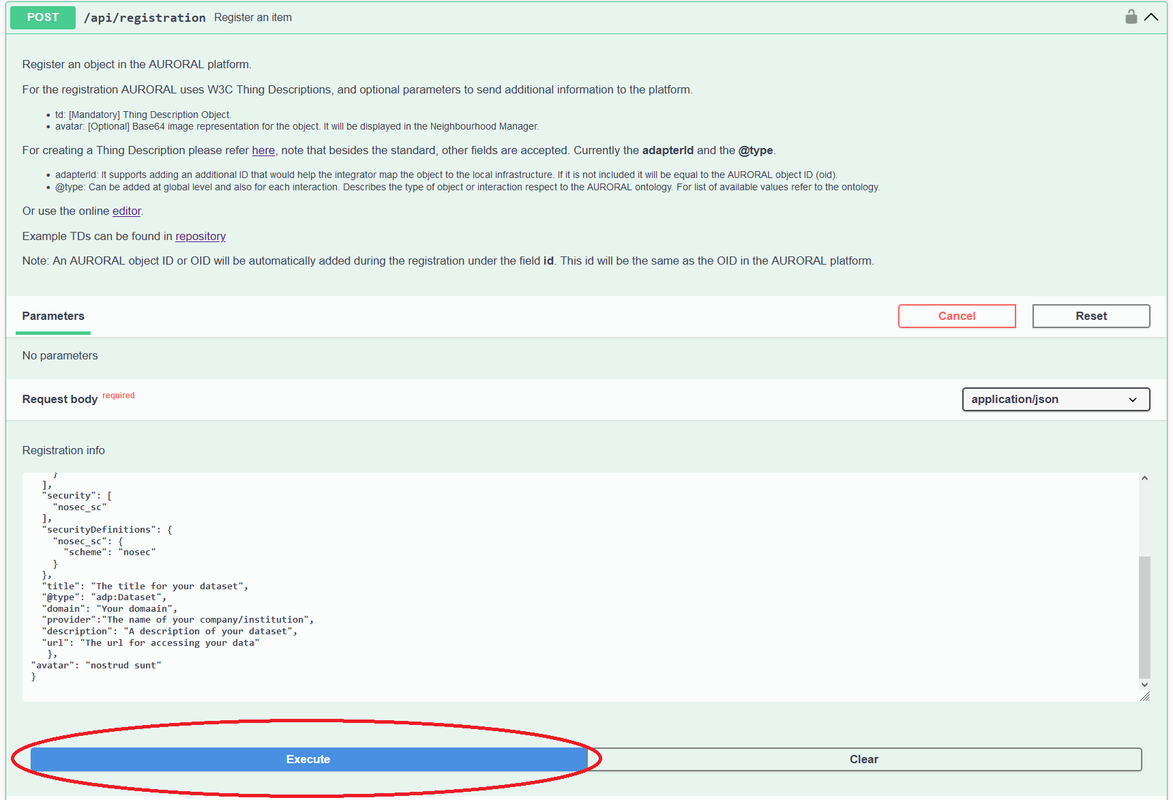
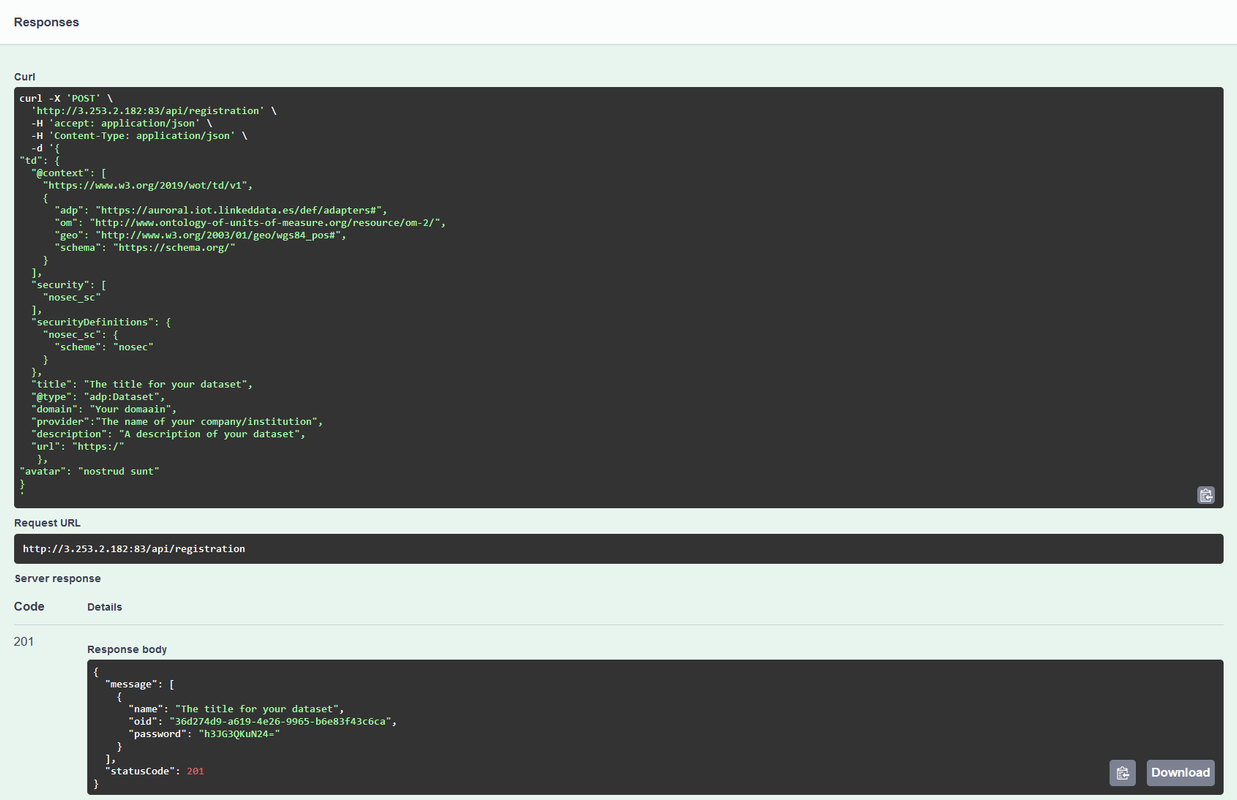
Then click execute, and you will receive the following response with a 201 code indicating that it was successfully registered:
For detailed instructions on how to submit, update, or delete metadata in the Web of Things (WoT) format, please refer to the AURORAL Open API documentation.
How to display them in the AURORAL Data Catalogue
Once you have registered your datasets, follow these steps to display them in the AURORAL Data Catalogue:
Access the AURORAL Platform:
- Log in to the AURORAL Platform.
Join the Data Catalogue Community:
Note: This step only needs to be done the first time you use a node to register datasets. If you use a different node in the future, you'll need to repeat this process for that node.
- Navigate to the Communities section from the left-hand menu.
Locate the Data Catalogue Community and access it. This community enables your node to interact with the AURORAL Data Catalogue.
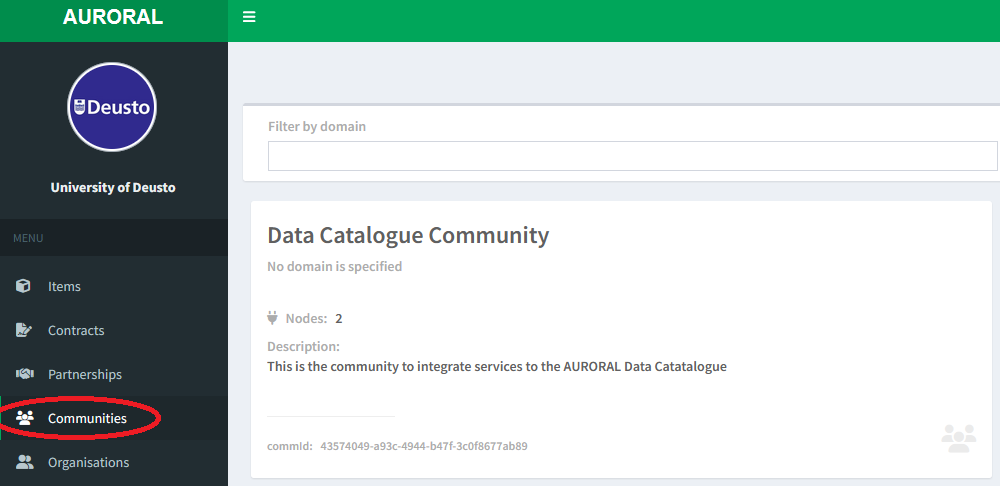
To join the community, click on Update My Nodes inside the Data Catalogue Community. You can do it just by pressing the red arrow on the node you are registering the dataset until a green check mark appears.
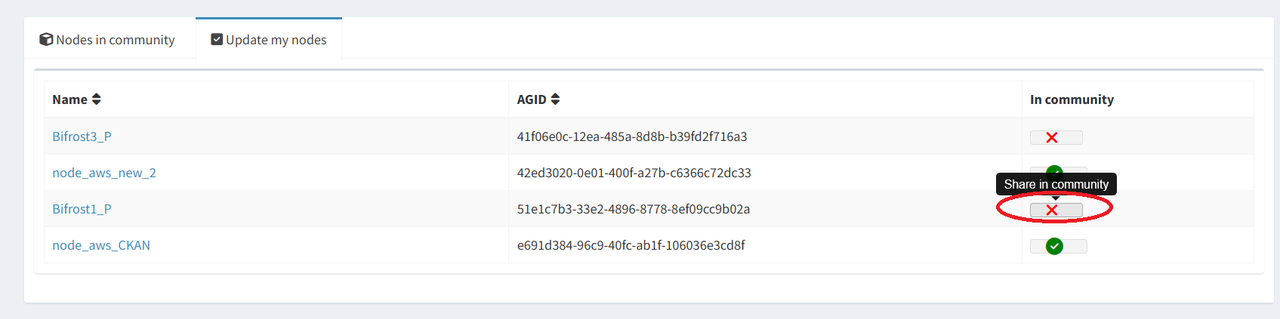
This way, you enable the node where you registered your datasets to share the metadata with the community. This step ensures that the node's datasets are synchronized with the AURORAL platform. To remove a node from the community, do the opposite.
Remember that you only need to update your node again if you use a different node in the future.
Enable Dataset for Public Access:
To be able to share data with the community, you also need to enable the item (dataset) and change its visibility level. For that:
Go to the Items section, where you will find the datasets registered through your node.
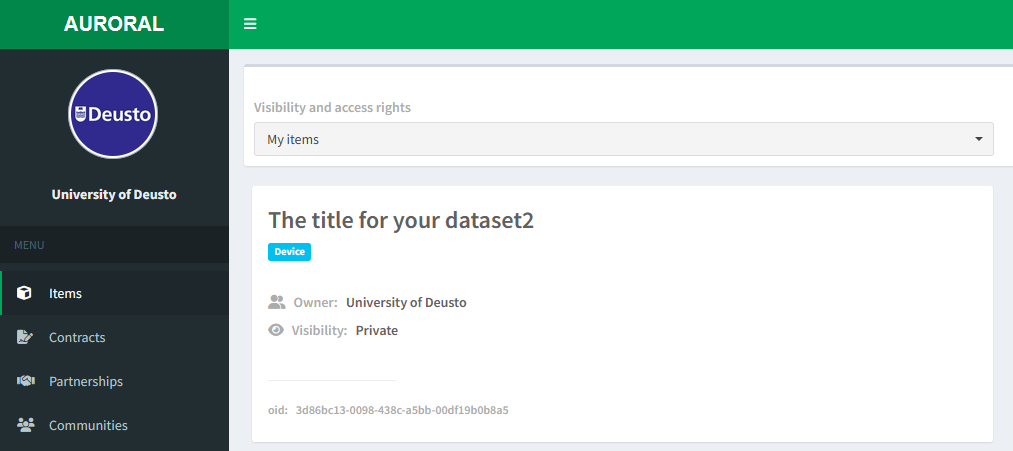
Click on the dataset you wish to display.
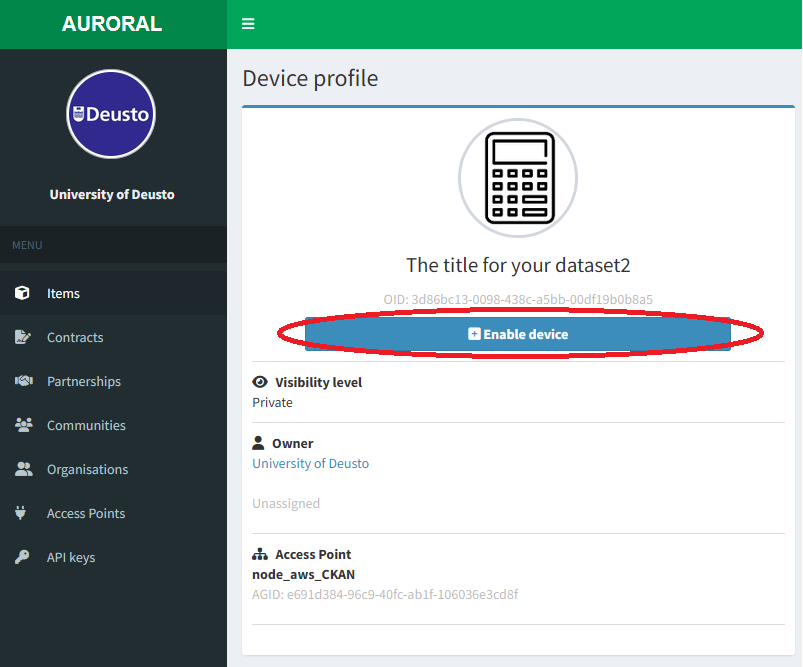
Within the item view, click on Enable Device to make the dataset active.
In the Visibility Level settings, choose Public with data under request. This option allows users to discover the dataset in the catalogue and request access to the data.
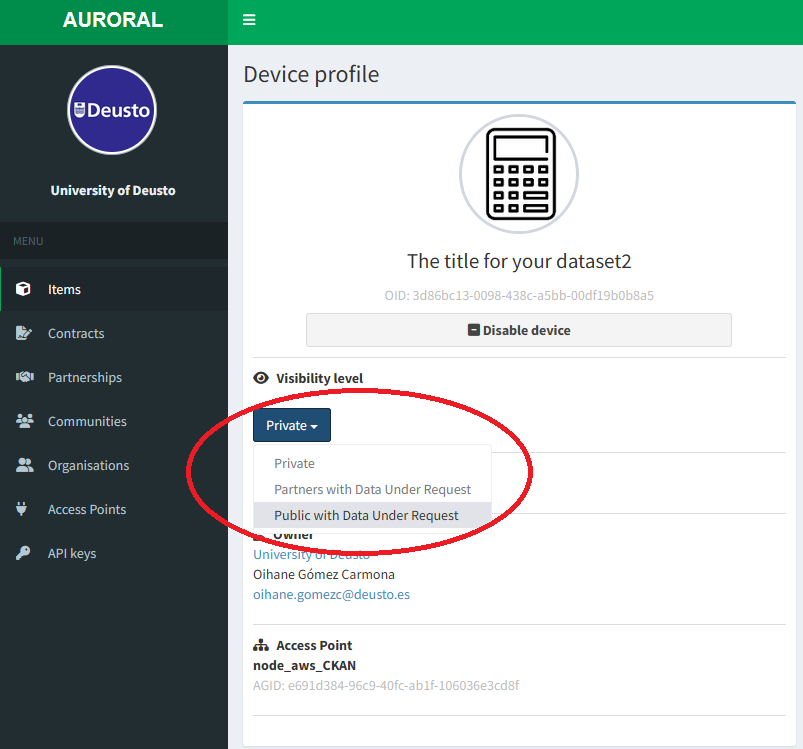
Now your dataset registration process is over!
Wait for Dataset to Appear:
- After enabling the dataset and setting the visibility, wait a few seconds. The dataset will automatically appear in the AURORAL Data Catalogue for other users to discover and request access.
Once these steps are completed, your dataset will be available to the public through the AURORAL Data Catalogue.
Common Issues and Troubleshooting
What should I do if my dataset doesn’t appear in the catalogue?
- Ensure that you have:
- Enabled the dataset item by clicking Enable Device.
- Set the visibility level to Public with data under request.
- Waited a few seconds for the catalogue to refresh.
- If the issue persists, verify that your node is properly connected to the Data Catalogue Community and that there are no network issues.
FAQ
1. How can I edit the photo and description of my organization in the AURORAL Data Catalogue?
To edit the profile photo and description of your organization, you need to fill out a form with the desired information:
Include the new description text and the profile image you want to use, then submit it to the AURORAL support team. The data catalogue will be updated with your changes.
2. Do I need to update my node every time I register a new dataset?
No, you only need to update your node the first time you use it to register datasets. If you decide to use a different node in the future, you will need to update that new node. However, for the same node, you don't need to repeat this process for subsequent dataset registrations.
3. How long does it take for a dataset to appear in the AURORAL Data Catalogue?
After enabling the dataset and setting its visibility to "Public with data under request," it should appear in the catalogue within a minute.
4. Can I register multiple datasets through the same node?
Yes, you can register multiple datasets either through the Node UI or by uploading multiple Thing Descriptions (TD) via the API. Just make sure that each dataset has its unique metadata and is correctly formatted.
5. Can I delete a dataset?
Yes, if a dataset is deleted from the node where it was registered, it will automatically be removed from the AURORAL Data Catalogue as well. This ensures that the catalogue stays up to date with the data available in the nodes. However, please note that the removal process usually takes longer than the registration process to be reflected in the catalogue.
6. Can I make a dataset private after making it public?
Yes, you can change the visibility setting from "Public" to "Private" at any time. Simply access the dataset in the Items section, and adjust the visibility level. Once set to private, your dataset will no longer appear in the public catalogue.
7. How do I edit an already registered dataset?
You can edit the metadata of a dataset through the Node UI. Access the dataset via the Items section, make the necessary changes, and submit the updated information. The changes will reflect in the AURORAL Data Catalogue shortly after.
Contact
If you encounter any issues or require further assistance, please do not hesitate to contact Oihane Gómez at oihane.gomezc@deusto.es.